Watch Contact Your Client
in action and be Amazed!

Contact Your Client Ultimate is the only All-inclusive CRM Software with Financial, Marketing, E-Commerce and Management Capabilities. Unbelievable!
Manage your whole business with ease.
One person is equivalent to ten employees when you use Contact Your Client Ultimate
Check these important features available
in Contact Your Client Ultimate:
All the features you want, need & love
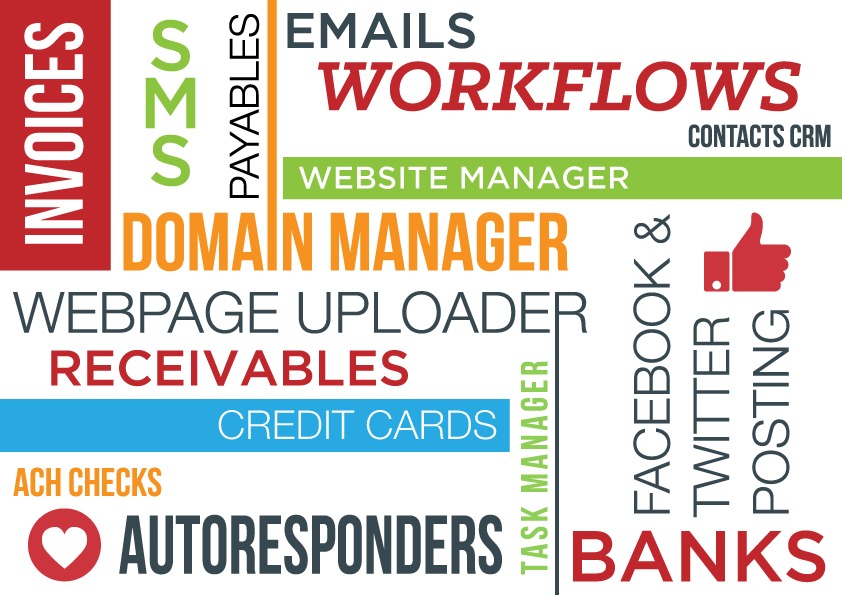
Contact Your Client is an all-inclusive CRM Software (Contact Relationship Management) with unique capabilities not found in any other CRM Software ranging from Invoices to Emailing, from Facebook Posting to Workflows, from Auto-Responders to Account Receivables and much, much more...
It is fast, inexpensive and accessible from anywhere in the world and from any platform (Windows, Macs, Smartphones, tablets, etc.) when used from a VPS (Virtual Private Server) but it can be used locally as well directly installed on your Windows or Mac (with Parallels operating system) computer.
Instead of using twenty software, Contact Your Client can manage your entire business with powerful marketing, financial, and management features.
While not trivial, Contact Your Client it is easy enough to be used by anyone with basic computer literacy.
ElasticEmail Integration
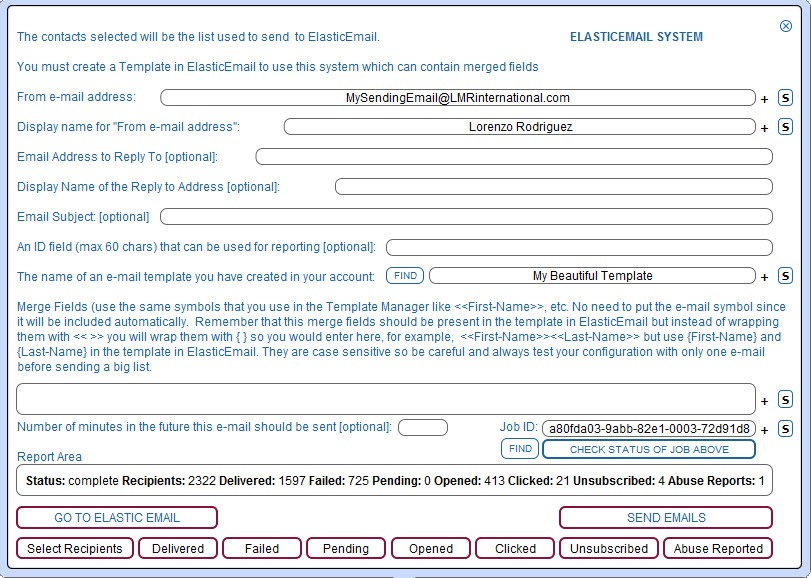
With Contact Your Client CRM you can select a group of contacts, and then with one-click, merge their data (usually first name and email but can be any) with Templates created inside ElasticEmail. So, in other words, you can send thousands of beautifully-designed emails directly from CYC and then know exactly which contacts were Delivered, Failed, Clicked, Reported Abuse and more.
Instructions: Video and PDF
ElasticEmail regular Email Sending
Since Contact Your Client has an integrated Email System to send and receive, you can use ElasticEmail to send regular emails by using its SMTP feature.
Unique Marketing Capabilities
Workflows
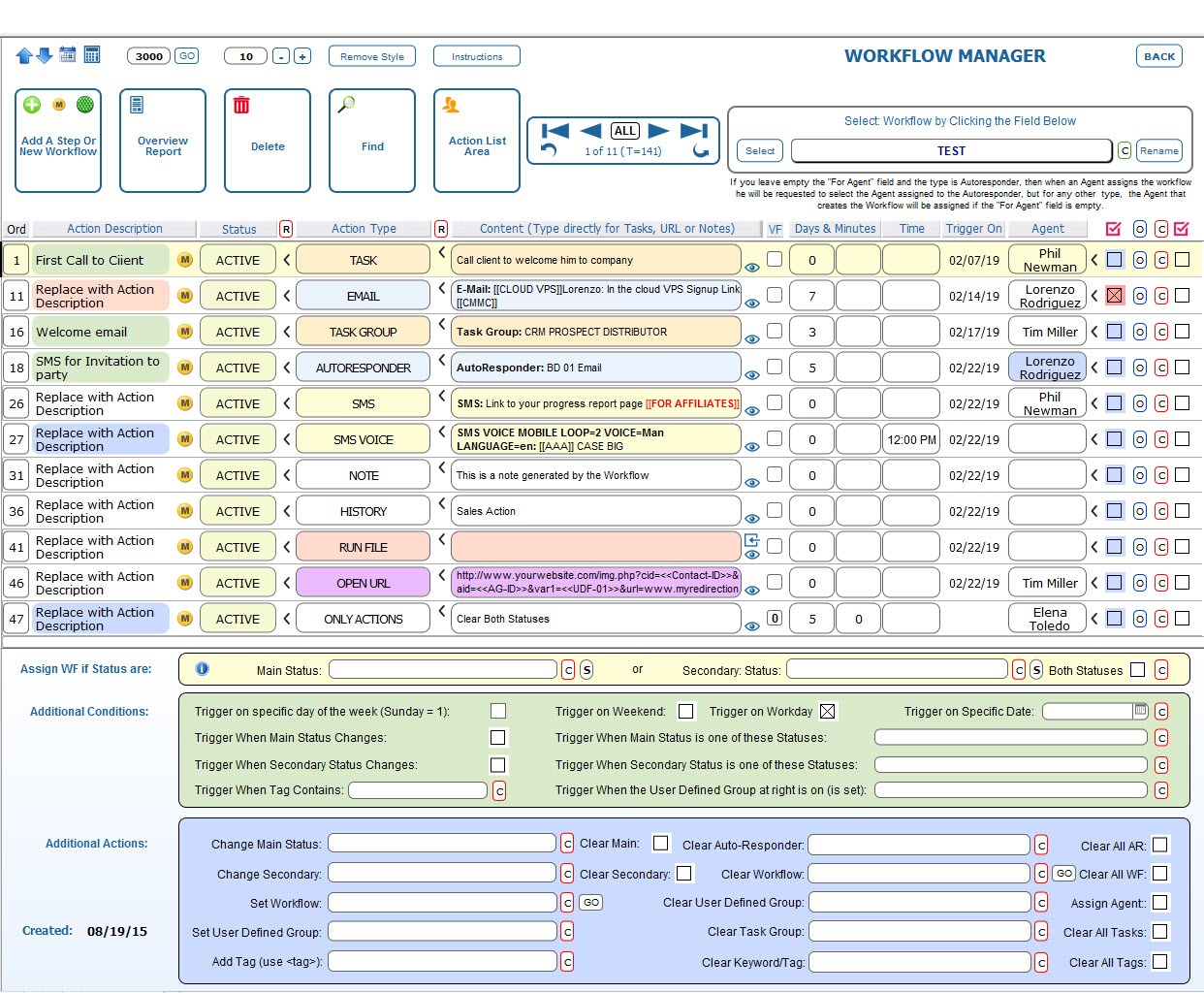
Create unlimited workflows with unlimited steps to automate sales and marketing actions for you and your clients. As opposed to other workflows that require a master in computers, our workflows are extremely easy to create and even easier to use. No need to drill down, everything is in plain view. You can set emails, autoresponder, SMS voice and text messages, notes, tasks, task groups, tags, etc.
Autoresponders
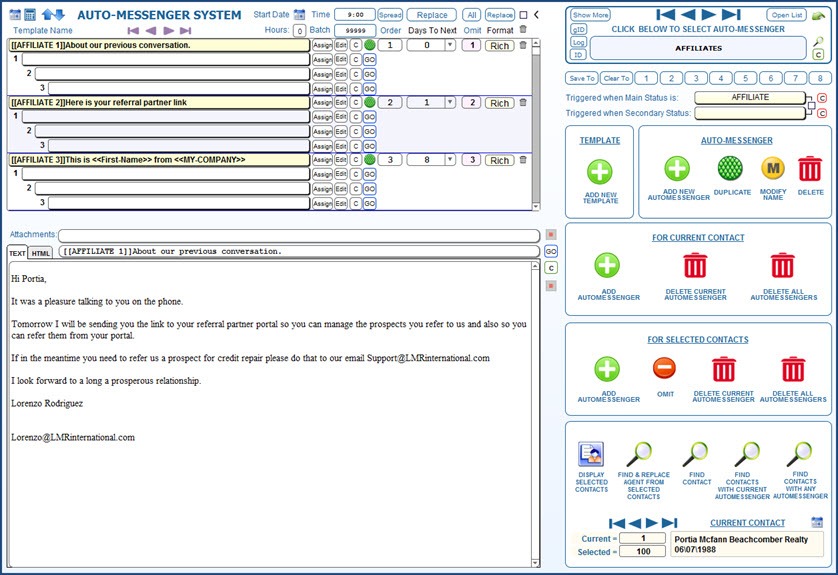
There many unique features around Contact Your Client CRM integrated autoresponder. They are contact-centric as opposed to autoresponder-centric, so it is very easy to assign autoresponders to contacts with one click. Start autoresponders on any date. Make changes in seconds, even on hundreds of letters. No need to create text and HTML codes individually Contact Your Client CRM does it for you from one file.
Integrated SMS
Contact Your Client is integrated with Twilio.com to send SMS. Send them for only 3/4 of a penny. Send one or send many with one click. Merge personalize contact data in SMS for more effective marketing. Use shortcuts for blazing speed SMS. Create unlimited canned answers. Also, send Voice SMS.
Twitter Post Scheduler
Post directly from Contact Your Client CRM. A unique recurrent system allows you to post automatically to Twitter throughout the day. You can manage unlimited accounts so you can offer this looked-after service to your clients.
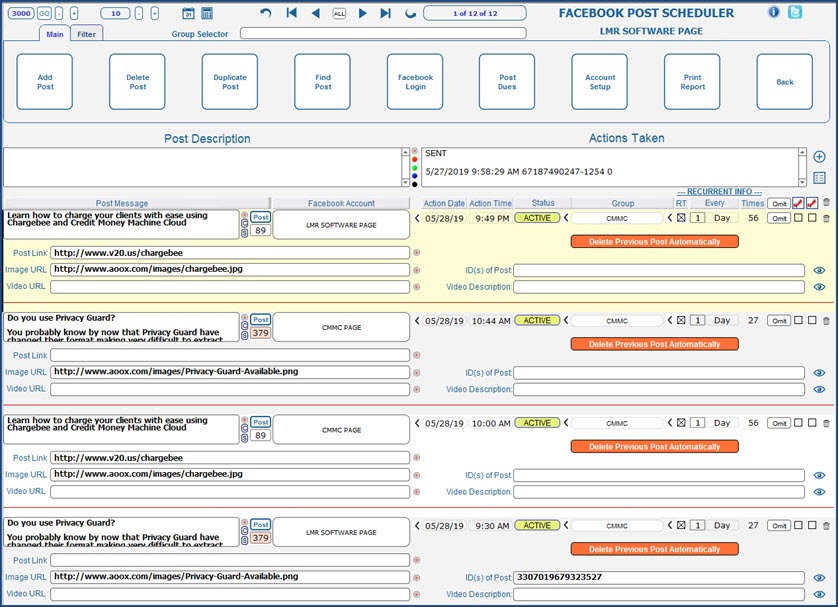
Facebook Post Scheduler
Post directly from Contact Your Client CRM to Facebook (a one-time payment of $299.97 is required to create an API and get the approval from Facebook). A unique recurrent system allows you to post automatically to Facebook throughout the day. You can post Text, Links, Images, and Videos automatically. You can manage unlimited accounts so you can offer this looked-after service to your clients (each account requires its own Facebook API.)
Telemarketing System
A very simple Telemarketing System is integrated in Contact Your Client. You can manage unlimited scripts that merge your data and your contact’s data into the script for easy reading.
Business Lead Finder
Find clients and affiliates with Contact Your Client CRM’s Business Lead Finder. Search for leads on any industry and import them with ease. Use the integrated Telemarketing System to excel with your sales pitch.
YouTube Manager
Manage the data of unlimited videos for easy searching and control on description, keyword, URL and more.
Workflow System
Auto-Responders
Facebook Scheduler
Email Related Capabilities
Full-Fledged Email System
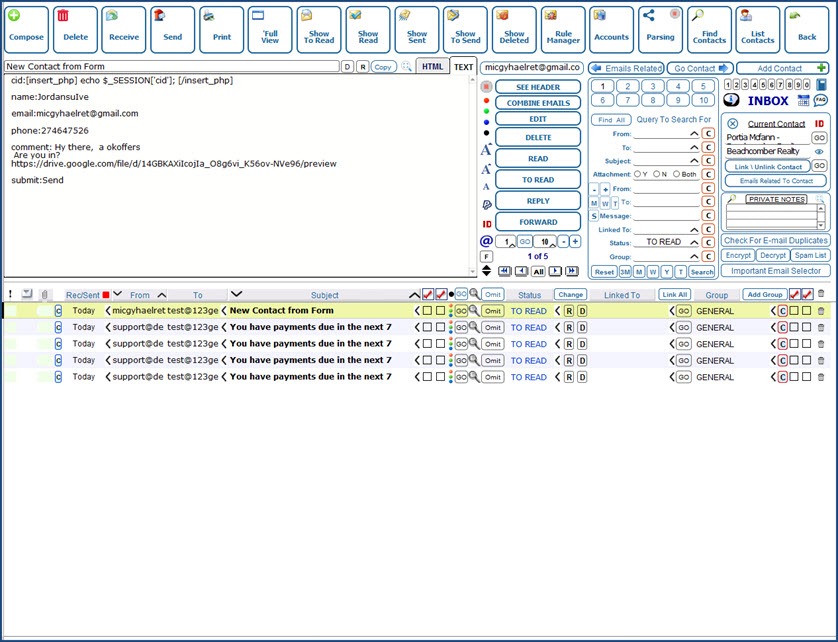
Contact Your Client can manage unlimited accounts. Send and receive emails. Find all emails send and received from one or selected contacts with one click including all the contact emails, linked emails, and even full domains emails. Save searches and retrieve with one click. Create contacts from emails. Four email systems to cover every possible need. Send emails from templates with merging capabilities and more.
Rule Manager
With the Rule Manager, you can identify an email automatically for further action or processing, for example, a rule can trigger another email, a reply, forward email, autoresponder or even trigger a workflow for truly unlimited actions. Contact Your Client CRM features a unique boolean system for complex identification.
Parsing System
With this parsing (extraction) system you can extract the data of an email, create a contact and use the data in the email to populate the record. Also, it is possible to use the parsing system to extract data from a list making ideal to create leads from lists on the Internet or from any type of form anywhere.
Email System
Rule Manager
.jpg)
Financial Capabilities
Full-Fledged Invoice System
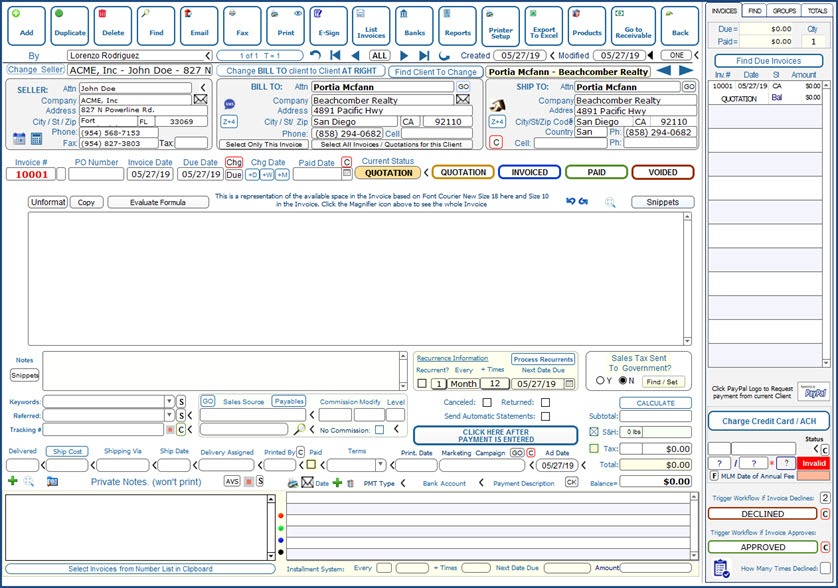
Product and Service Invoices. Linked to the inventory system. Charge invoices with Credit Cards or ACH Checks. Print, fax or email invoices. Select contacts based on invoices selected. Manage partial payments. Use marketing fields. Also there is a comprehensive products and inventory area when you can have the data of products you buy and resell plus cost, prices, discounts, conditions, etc.
Account Receivables
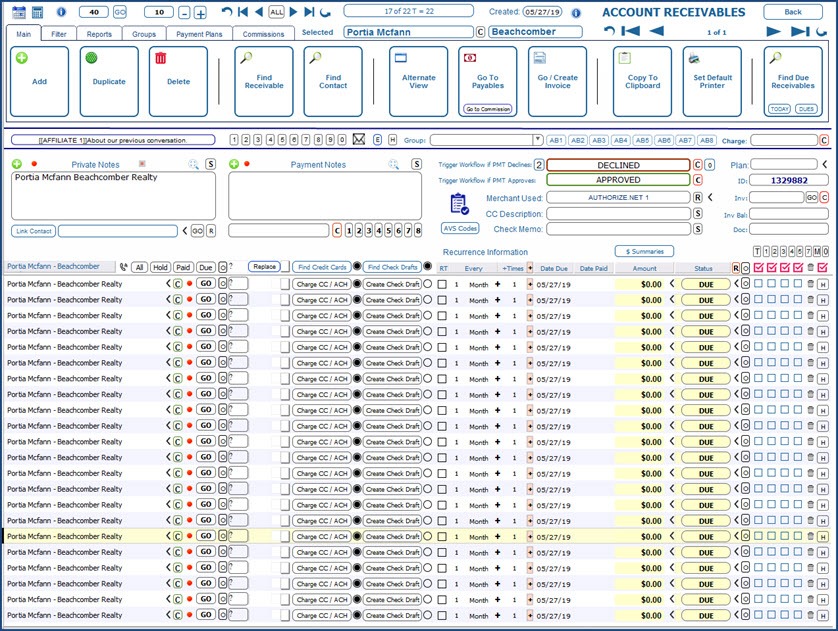
Charge all due accounts with one click. Charge using Credit Cards, ACH Checks or Check Drafts. Select clients based on receivables and receivables based on contacts selected. Trigger receivables automatically based on recurrence. Trigger workflow automatically on declines and approvals. Create and email reports.
Account Payables
Create payables automatically based on the payment of receivables and commissions assigned to affiliate/payor. Unlimited unilevel commission system. Creation of unlimited checks with one click to pay for payables as well as envelopes. Create reports, and more.
Bank Manager
Control unlimited bank and credit card accounts. integrated reconciliation system. Linked to Payables and Receivables for automatic entry. Creation of checks and check drafts.
Other Financial Tools
Too many to enumerate. Contact Your Client CRM includes a Financial Dashboard, a Debt Reduction Analyzer, Loan Amortization Center, Budget Manager, etc.
Invoice System
Account Receivables
CRM Business Management Capabilities
Contact Relationship Management
We strongly believe that Contact Your Client CRM is the best business CRM in its category. Manage unlimited contacts (clients, leads, affiliates, etc.) Link unlimited documents to any contact. Send SMS messages, emails, assign unlimited tasks per contact and much more.
3 Levels to Choose from
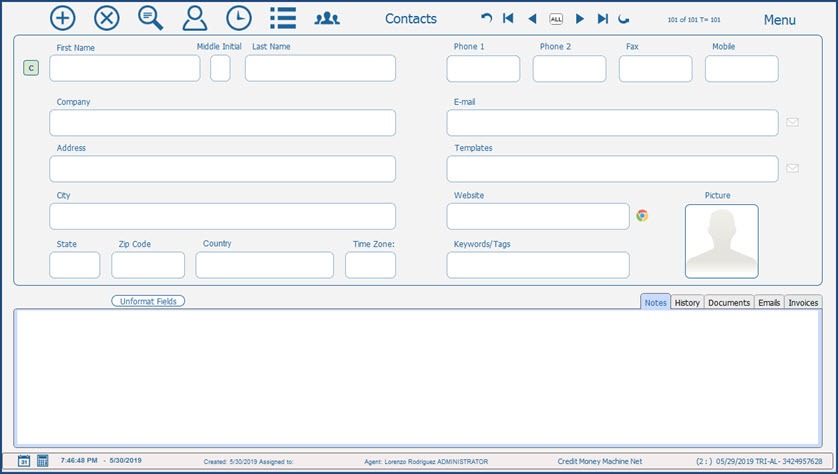
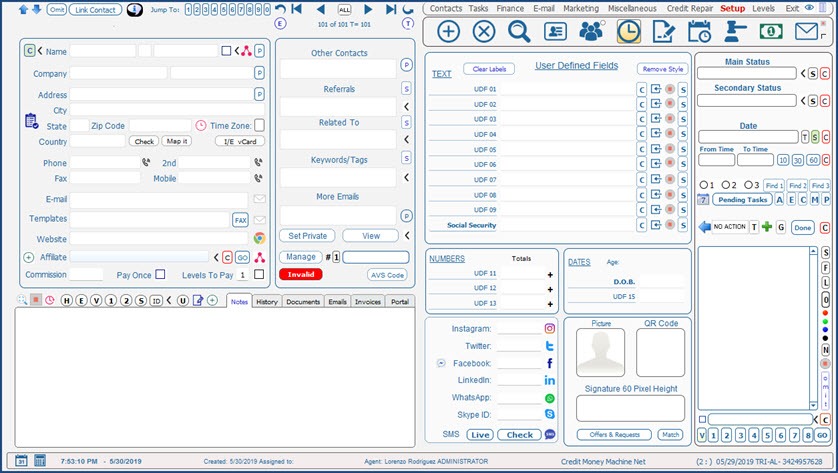
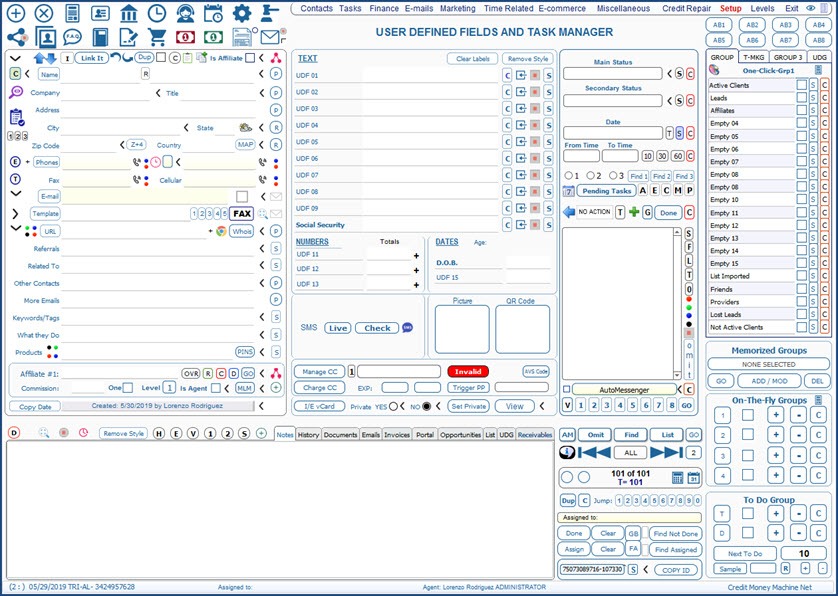
Contact Your Client CRM features three levels of use (Simpler, Advanced and Expert). It is like having 3 CRM at one time and you can change levels back and forth as you please.
Total Integration
As opposed to having a myriad of programs to accomplish many objectives, Contact Your Client CRM integrates all the tools that you and your business need to manage, promote and effectively maintain communication with your company.
Time-Saving Features
Contact Your Client CRM has many unique features not found in other CRMs, for example, you can check if a contact is a duplicate of another with one click based on the parameters that really matter (phone numbers, emails, URLs) then you can use the Compare Contacts feature where you can merge that data of duplicate fields very accurately and easily.
Manage Thousands of Contacts with ease
Contact Your Client is powerful. You can manage half a million records and more with ease. Many CRM choke with a few thousand records but not Contact Your Client. The same can be said about having thousand of emails and being able to search them with one click.
Unlimited link of Documents per contact
Link unlimited documents per contact as paths or internally in the database.
Unlimited Groups per contact
Contact Your Client features unlimited groups per contact. There are many type of groups, One-Click Groups, Memorized Groups, On-The-Fly Groups, To-Do Groups, and User Defined Groups plus its searching capabilities allow quick selection of groups to be used for marketing purposes, and others.
Integrated Template Manager
Manage unlimited categories and unlimited templates per category. Merge unlimited fields per template for complex letters that can use many contact fields. Use the integrated spinner system that creates unique letters every time they are printed. Email group of letters using several systems, Bulk, ElasticEmail, AWS and more.
CRM Simpler Level
.jpg)
CRM Advanced Level
.jpg)
CRM Expert Level
.jpg)
Many Unique Features...
Domain Manager
Control every aspect of your domains and your client’s domains. Enter notes, DNS, emails data, FTP, RDP, Unlimited Fields, Hosting, and, Registar information and more.
Website Manager
Manage your websites and your client’s websites.
Web Page Uploader
Manage website pages for you
Multi-Media Campaign Analizer
Do you do Radio, TV and Magazine campaigns? Do you know how to track them and know if they are profitable or not? Do you know what are the best slots in you Radio or TV campaign? If you want to know the Media Campaign Analyzer is for you.
Tracking of Marketing Campaigns
If you want a simple system to track who clicks where or to verify what other system are tracking and changing are correct you will appreciate the flexible, simple and useful Tracking of Marketing Campaigns.
CRM Unique Features
Saying CRM Unique Features does not do justice to the many important CRM capabilities. Sometimes is just a simple unique searching system or it could be a very powerful duplicates and comparison/merging system. Discover the hundreds of special feature by yourself.
3 User Levels to Choose From
It is like having 3 CRM software in one. 3 levels of use, Simpler, Advanced and Expert. Use it at your level of computer literacy. From beginners to experts.
Total Integration
Avoid data duplication. Every possible area is tightly integrated into others for a most powerful experience possible.
Time-Saving Features
As opposed to other CRM software, Contact Your Client Ultimate is designed for power and to save time specifically the Expert level is designed spend the least amount of time per action.
Metrics Analyzer
You decide what to analyze. Just assign a code to the Metrics Analyzer and you would be able to track it, graph it and compare with any other code.
Checks Printing
Print unlimited checks with one click from unlimited bank accounts. Print blank checks as well.
Knowledge Database
Having an integrated Knowledge Database is extremely useful. You can save articles, URLs, images, explain solutions for yourself and others, and most importantly, being able to search for them with ease.
F.A.Q. Manager
With the integrated F.A.Q. System (Frequently Ask Questions) you can have a set of canned answers for your clients and even interact with them inside the system. Kind of a mini-help support system.
Groups Galore
There are indeed unlimited groups in Contact Your Client but the most relevant are: One-Click Groups (60 of them) Memorized Groups, On-The-Fly Groups, To-Do Groups and User Defined Groups (unlimited).
Maintenance & Inventory Manager
We know the importance of maintenance in the office (or home) but we often lack of a system to remind us and to manage when things have to be service, where to find the pieces and their location. But now we can manage all that with ease and from one roof.
Favorite-Websites Manager
How many times you find an interesting website or internet article and you don't know where to save it. Now, you can do it in this area and be able to find them with keywords and launch them with one-click.
Affiliate Media Marketplace
This very special area will allow you to provide your affiliates with media like images (banners), emails, videos, text links, etc. branded with your affiliate special code. This way your affiliates can use the code provided directly without any coding knowledge just copy and paste into their websites to promote your products and services.
Budget Center
A very simply budget system when you can see at-a glance where your money (or your client's money) goes and compare with the accepted standards in numeric and graph forms.
Workflow System
If you have used other workflow systems to automate sales and/or marketing actions you know how difficult is to program them and even more difficult when you want to modify them since you mostly sure would need to drill down any node to know it content and be able to modify it. With Contact Your Client's workflow system all the actions and their parameters are in plain view all the time so really anyone can create modify and even enjoy doing your own workflows with extremely ease.l
Autoresponders
Our auto-responder system is contact-centric as opposed to auto-responder-center. It is very easy to assign autoresponders to groups of contacts, find contacts with a particular auto-responder, know which auto-responders are assigned to a contact,etc. Also the auto-responders can be duplicates and are originated from Templates so making changes is a breeze.
Integrated SMS System.
Contact Your Client is integrated with Twilio to send text and voice messages but it has many feature not found in other systems. For example, you can have unlimited text snippets to reuse with your SMS, merge fields in texts, sending text to multiple contacts, and much more.
SMS Live
Receive SMS messages and trigger Workflows automatically based on keywords. You can have unlimited triggers. Check the complete line of communication with contacts.
Twitter Post Scheduler
Post automatically to Twitter not only scheduling the posts but posting recurrently automatically.
Facebook Post Scheduler
Post automatically to Facebook not only scheduling the posts (Text, Links, Images and Video) but posting recurrently automatically. A one time fee of $299 applies to set up the API and approval process from Facebook.
Telemarketing System
Contact Your Client has an integrated telemarketing system with merging capabilities where you can manage unlimited scripts and branches. You can view scripts with ease from the task manager
Bank Manager
Manage all your banks and credit cards accounts. Integrated register and reconciliation system. Print checks and check drafts.
Purchase Manager
Control all your purchases know when they should be delivered how much they cost, from whom you bought them how to reorder and more in perfect control
Template Manager
With the Template Manager you can classify your letters into unlimited categories and then have unlimited letters within. Use unlimited merging fields per letter even your own defined merge fields. Use them for contracts, marketing letters to email, etc.
Subscription Manager
Manage all your subscriptions. Know what credit card you used to pay for a subscription. Expiration dates and every aspect of your subscriptions.
Gig Manager
Whether you order your gigs from Fiverr.com or anywhere else there is no better place to manage all that important information than the Gig Manager.
Agent Job Scheduler
Contact Your Client has an Agent Task Scheduler to manage all those specific agent tasks that are not related to contacts.
Marketing Task Manager
Manage all your marketing campaigns from one place. Who is handling what. How long they should be running.
Virtual Contacts
You can post groups of contacts to an online portal and then access them from your smartphone or any other internet device.
AWS E-mail (Amazon Web Services)
Contact Your Client is integrated with AWS to send thousands of personalized emails with ease.
Client Valuation
A unique area where you can evaluate the "value" of your client not only from the amount of money they spend on your products and also subjectively based on time they take from you and many other factors. Know the "real" value of your clients.
Task Manager
Our Task Manager is pretty special. Contact Your Client features a Contact-centric system. This means that you can see all the tasks assigned to a contact in one place across all agents. Also, you can create multiple tasks assigned to different agents.
Business Lead Finder
Find leads with ease from any industry with the integrated Business Lead Finder and import the leads with ease. You can use it in conjunction with the Telemarketing System and the Auto-Responder System for a killer marketing combination.
YouTube Manager
Manage all your videos and/or your clients' videos — Control Description, Keywords, URL, original path, etc.
Full-fledge E-mail System
Contact Your Client features a comprehensive e-mail system that send and receives e-mail from unlimited accounts. Create account for gMail, Godaddy, your own domains etc. Select all e-mails sent and received from a contact or group of contacts including all contact e-mail accounts with one click. It is probably the best e-mail system ever devised.
Rule Manager
The Rule Manager identifies an e-mail and then triggers emails, auto-responder, workflows and triggers a parsing (extraction) scheme to create a new contact and import its data. You can even use boolean logic to identify emails.
Parsing (extracting) System
The Parsing System is used to extract data automatically from forms or from the internet.
Invoice System
There is a full-fledge Invoice System where you can have recurrent invoices, charge with Credit Cards or ACH checks, trigger commissions, do partial payments, have private notes, track shipping, etc.
Account Receivables
Control payments with ease, trigger commission into the Account Payables, charge one or unlimited charges with one click, charge with credit cards, ACH checks, check drafts, and digital checks.
Account Payables
Contact Your Client features an unlimited unilevel commission system that trigger when there is a charge in the Account Receivables. Create checks to pay your affiliate with one click and much more.
Password & License Manager
These days there are hundreds of passwords that must be managed and I am not even talking the email passwords but programs, Facebook, Twitter, and so many others. Also you would like to manage your licenses and similar private codes.
Company Calendars
While Contact Your Client has unlimited calendar for a variety of purposes it has 10 of them that we called Company Calendars. These could be accessible by anyone unless they are prevented from seeing some so agent can share the calendar content with other member of the company.
Virtual Desktop Manager
Imagine a Windows desktop with the features you love to have. Search by anything have long list of explanations Know who is the seller of a product go to their website and much more It would be great that Windows would have but since they don't we did it.
Debt Reduction Analyzer
Debt Reduction Analyzer is a self-contained system to optimize your debt monthly budget, and at the same time, remind you when to pay and how much for each debt. Our slogan Pay on Time, Pay Less, Pay Faster.
Opportunity Analyzer
Manage all your opportunities across all your clients and prospects. See all your goals in one place and select many contacts or just one for your analysis.
Time Manager
Do you do consultations? Do you charge your clients based on time spent? If you answered yes, then our Time Manager can help by recording the time you spend with a client on the phone or simply working for him. Also, it control the time your agents spend inside the program and you can product reports and even create invoices based on time and money charged per hour.
Contact Your Client is an all-inclusive CRM Software that manage every aspect of your business under one roof.

Call us for a live presentation or to answer your questions
at (954) 568-7153
LMR International, Inc., is a corporation dedicated to the development of software for the last 29 years and counting. Not only our dedication is complete but our approach to solving problems is unique in the industry. You can expect the highest quality of software and service from our company.
Contact Your Client is the Fastest, Easiest, and most powerful CRM Software with the correct tools that you Want, Need and Love.
REGULAR PRICE $249.97 / MONTH. LIMITED TIME GRANDFATHERED-OFFER $199.97/ MONTH CANCLE ANYTIME
What happens when you upgrade to Contact Your Client from another software
First, it would be a very easy process since we can import your contacts in seconds from different formats to your new program. Most importantly, you will experiment a new speed, your business will be automated, your work time will be reduced, you’ll get more features, so more bang for your buck, and you will relax when you use Contact Your Client since it’s the most powerful CRM software that you’d ever used.
SPECIAL OFFER
Regular $249.97 /m
Limited-Time-
Grandfathered-Offer
$199.97/m
Everything is included, Unlimited Clients, Unlimited Leads, Unlimited Affiliates, Unlimited Portals and Unlimited Credit Audits.
Only $199.97/month
(cancel anytime)
100% Privacy. We Will Never Spam You!
Questions: Call us at (954) 568-7153
Six reasons why it would be crazy not to use Contact Your Client Ultimate
01
FAST AND SECURE
Contact Your Client is hosted in-the-cloud so you can use it from anywhere in the world and from any platform but it is not a web-based program but a Windows-based connected using RDP (an app that connects your computer to our servers with one click) It is very fast because the program's database is only used by you, no other user have clients in your database. The database is not shared with anyone else. In other words, there is no chance that any other client of ours would have access to your clients like it may happen in other systems. Still it is possible to install it on your computer in certain cases.
02
BUILT IN ACCOUNTING
Contact Your Client has all the pieces to manage your accounting. A full-fledged Invoice System, Account Receivables, Account Payable, Commission System, Bank and Credit Card Manager with Reconciliation, Checks Printing, Check Draft Printing, Digital Checks interaction, Charge of Credit Card, Charge with ACH checks, more...
03
ADVANCED E-MAIL SYSTEM
We all know how important is to e-mail our leads, clients, business partners and friends. Contact Your Client has an integrated e-mail system to send and receive, you can have unlimited accounts, and most importantly, you can find the line of communication with any contact or group of contacts with one click. That would include all the emails sent and received from all contact accounts and all account from your company becoming an invaluable tool of knowledge done in a fraction of a second. CYC interacts with ElasticEmail and AWS Email to send thousands of emails fast and easy.
04
POWERFUL MARKETING TOOLS
Probably too many to mention but the main ones are: integrated Workflows, Contact-Centric Autoresponders, E-mail System, integration with ElasticEmail, integration with AWS E-mail (Amazon Web Services), tracking of marketing campaigns, SMS System, Multimedia Campaign Analyzer, Affiliate Media Marketplace, Facebook Scheduler Posting, Twitter Scheduler Posting, etc.
05
UNIQUE POWER TOOLS
Contact Your Client has many features simply don't available anywhere. that others don’t, like Password & License Manager, Parsing System, Subscription Manager, Knowledge Database, List Manager, Maintenance & Inventory Manager, ultra-powerful Task Manager, Virtual Desktop Manager and much more.
06
INEXPENSIVE & EASY TO USE
Contact Your Client is the price performance leader. With CYC you will have Unlimited Clients, Unlimited Leads, Unlimited Affiliates and Unlimited Bandwidth all for only for $249.97/m.
For a limited time get it for $199.97 / m (grandfathered)
Do you have a question? Do you have a suggestion?
If so, Contact Us in the form below, call us at (954) 568-7153 or open a Support Ticket at www.LMRsupport.com
SPECIAL OFFER
Regular $249.97 /m
Limited-Time-
Grandfathered-Offer
$199.97/m
Everything is included, Unlimited Clients, Unlimited Leads, Unlimited Affiliates, Unlimited Portals and Unlimited Credit Audits.
Only $199.97/month
(cancel anytime)
100% Privacy. We Will Never Spam You!
Questions: Call us at (954) 568-7153
See what some of our customers have to say:

In these tough economic times, we must all tighten our belts. Without your CRM software,my business would have shut down a long time ago. The software's unique tools allow a single person to be as productive as five, representing enormous savings in my operating costs. For many years, I've searched for software that would unite two worlds that are critical for any business: invoicing and sales/marketing. The only product out there doing this is your CRM software, which makes it so unique and powerful for business owners like me
Dr. Isaac Morhaim
President, NatuEnergy

The Only Software I use
Before using Contact Your Client , I needed to use at least four applications to do the work I do now.
Contact Your Client is everything they say and more.. fast, flexible and powerful. I recommended it for any business that requires a CRM.
Steven Hoffman
Credit Consultant USA
No Risk, 30-day Money Back Guarantee!
There is nothing to lose and so much to gain. Click below to order now.

30-DAY MONEY BACK GUARANTEE... NO QUESTIONS ASKED!
If for any reason you are not satisfied with Personal Credit Cloud during your first month simple request a cancellation here for a fast and courteous refund. Your satisfaction is guaranteed 100% Act now.!

Lorenzo Rodriguez - President
P.S.: May I remind you that our limited-time Grandfathered-Offer won't last forever so act now and avoid regrets later. When is gone is gone!. With our 30-day Money Back Guarantee there is nothing to lose and so much to gain. The ball is in your court, act now!
Click HERE to see some other amazing products
LMR INTERNATIONAL INC
Copyright 2020 All Rights Reserved By LMR International, Inc